
AI Garden Design From a Photo, and the One Thing It Gets Wrong
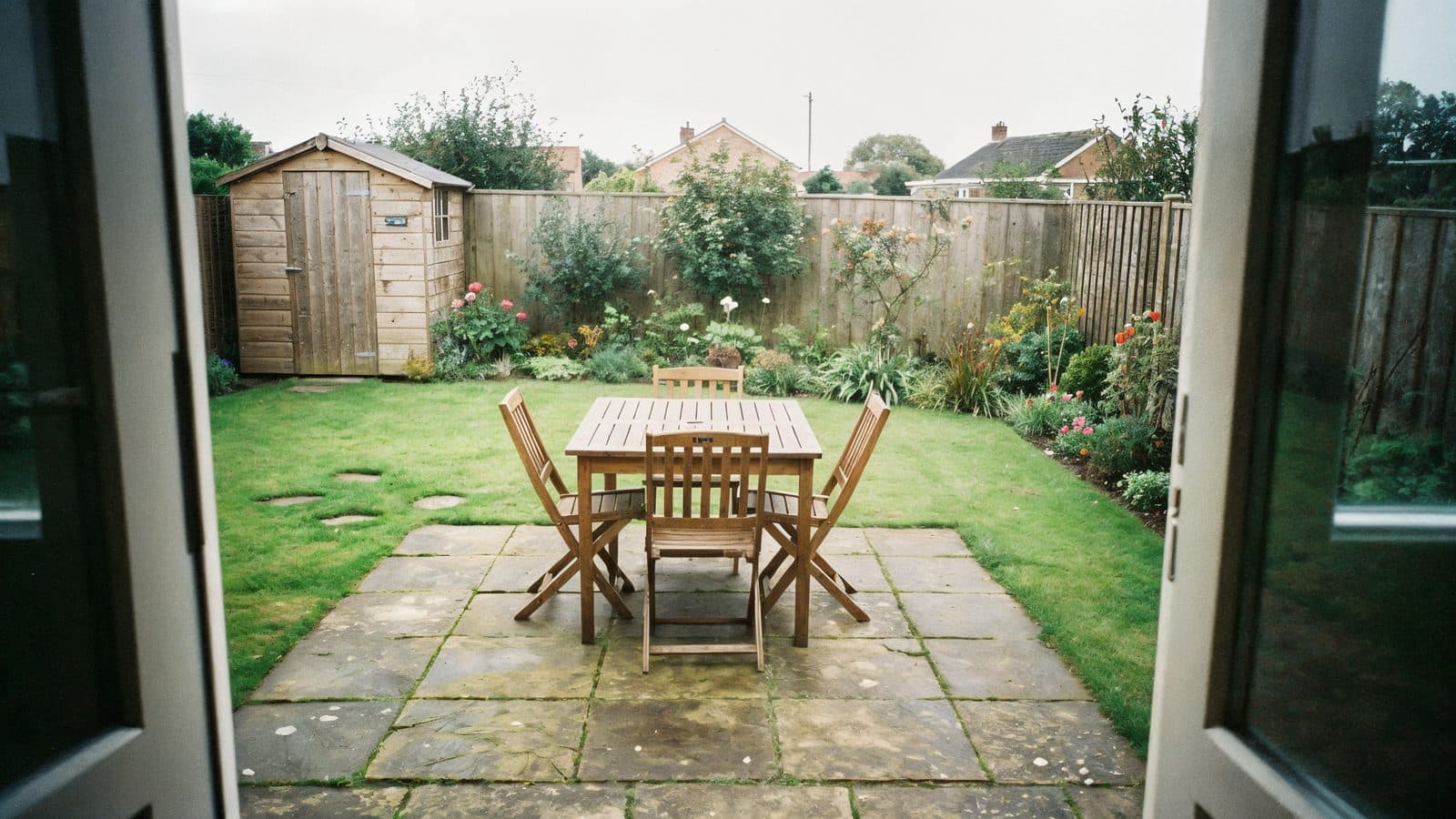
You can stand in a room and know it. A garden you have to imagine three seasons ahead, and almost nobody can.
A room is a fixed box. You put a sofa in it, the sofa stays that size. A garden changes shape three times a year, grows two metres in a direction you didn't plan for, and looks completely different depending on whether you're standing at the kitchen door or the back fence. Which is why so many gardens end up as a lawn with a border round the edge. Nobody could picture the alternative.
AI garden design fixes the picturing problem. It does not fix the plant problem, and most people find that out the expensive way.
The demand is real and it's growing
I pulled Google Trends for the twelve months to the end of August 2026. "ai landscape design" averaged 7 on the normalised scale, which sounds small until you look at the shape of it. It sat around 4 to 5 through autumn 2025, and hit 13 to 14 by late April and May 2026. Roughly a doubling year on year.
The related searches climbing alongside it are "landscape architecture", up around 160 percent, and "landscape and design", up about 100 percent. So it's not just homeowners playing with a toy. Professional interest is moving too.
Same seasonality as everything else in this space, only sharper. Nobody thinks about their garden in December.
What it does well
Hard landscaping, mostly. And hard landscaping is where the money goes anyway.
Paving and patio layout. Where the terrace sits, how big it needs to be, what happens where it meets the lawn. This is the single most useful thing to test visually, because a patio that's too small is the most common and most expensive garden mistake there is. Everyone underestimates. Then they put a table and six chairs on it and there's nowhere to walk.
Levels and steps. Sloped gardens are almost impossible to picture from a plan, and AI renders make the difference between one big retaining wall and two shallow terraces immediately obvious.
Structures. Pergolas, garden rooms, sheds, outdoor kitchens. Whether the thing dominates the garden or sits in it.
Paths and routes. Where people walk, which is almost never where the path is.
Boundaries. Fence, hedge, wall, or some combination. Changes the whole feel of a garden and costs a lot to redo.
Lighting. Hard to imagine, transformative when it lands, so worth rendering.
Upload a photo to Exterior AI and it'll hold your garden's shape, boundaries and house steady while it reworks the layout. Same as for facades. The garden version of Luw.ai's Landscape AI is designed to match the render to the light and climate of your location, which helps, but read the next section before you trust it on planting.
The plant problem
Here's the thing nobody tells you.
An AI render will show you a gorgeous border. Full, layered, flowering, everything at its peak. It's showing you a garden in June, in an idealised climate, three years after planting, maintained by somebody with time.
Your garden is not that. Your garden has clay soil, gets four hours of sun on the north side, faces a prevailing wind off the west, and belongs to somebody who is going to water it enthusiastically for one summer and then stop.
The render doesn't know any of that. It generates plants that look right in the image, not plants that will live in your conditions. I've seen renders with sun loving Mediterranean planting in a shaded courtyard, and hydrangeas in a spot that would cook them by July.
So use the render for the shape of the planting and not the species. What you are getting from it is: how tall should this bed be, roughly how much of the garden is planted versus paved, where does the height need to be, what's the balance of evergreen to seasonal. Those are the real design decisions and the render answers them well.
Then take that shape to a plant list built for your actual conditions. Your local nursery will do this for free in about ten minutes if you show them the render and tell them your aspect and soil. That combination, AI for the layout and a human for the species, gets you something that looks like the picture in three years instead of dying in one.
How to shoot the photo
From the house looking down the garden, and from the far end looking back at the house. You need both, because gardens are experienced in both directions and people forget the view back.
Overcast, again. Dappled shade through trees is the hardest thing for these tools to handle and bright sun through foliage produces a mess.
Get the boundaries in shot. Fences and hedges define the space more than anything you'll put inside it.
Shoot in the season you're in, and don't worry that it looks bare. A bare February garden is easier to redesign from than a June one, because the structure is visible and there's less for the model to have to remove.
Include the house where you can. Gardens that ignore the building they're attached to look wrong, and having it in frame keeps the render honest about scale.
Sequence the work properly
Decide the hard landscaping first, then the planting, then the lighting. In that order, always, because it's the order the work happens in and each one constrains the next. Rendering a beautiful planting scheme before you've settled where the patio goes is wasted effort.
Get the patio size right before anything else. Rule of thumb: a table for six needs about 3.5 by 3.5 metres to be usable, once you account for pulling chairs out. Most people build 3 by 3 and regret it. Render it with the furniture in place and you'll see the problem.
And think about maintenance while you're looking at the render. That image represents a level of upkeep. Ask whether you are going to do it. A slightly less impressive design you will keep on top of beats a spectacular one that goes feral by August.
Common questions
Can AI design my garden from a photo?
For layout and hard landscaping, yes. Upload a photo and it'll hold your garden's shape, boundaries and house steady while reworking the paving, levels, structures and planting areas. Treat the specific plants in the output as illustrative rather than as a planting plan.
Is AI garden design free?
There are free tiers. Luw.ai lets you run garden and exterior renders without paying, with paid plans for higher resolution and volume. For one garden, free is enough.
Will the plants in the render survive in my garden?
Probably not all of them, and this is the main limitation of the whole category. Renders optimise for how the image looks, not for your soil, aspect, climate zone or rainfall. Use the render to decide the structure and massing of the planting, then get species from a local nursery or a planting plan.
Can I use it for a sloped garden?
This is where it earns its keep. Sloped gardens are the hardest to visualise from drawings, and seeing the difference between a single retaining wall and stepped terraces makes the decision much easier.
Does it work for small gardens and courtyards?
Very well, because small spaces are where layout mistakes hurt most. There's no room to absorb a patio that's the wrong size. Small courtyards are also easy to photograph completely in one frame, which improves the render.
Can I show the renders to a landscaper for a quote?
Do, and you will get a better quote for it. A render of your own garden removes most of the ambiguity from the brief. Be clear with them that the planting is indicative so they know to price the hard landscaping from the image and discuss species separately.
Start here
One photo from the kitchen door, one from the back fence, on a grey day. Render the hard landscaping only, with the planting kept simple. Get the patio size right. Then talk to somebody about plants.
Try it on your garden. It takes about as long as making a cup of tea.
Related reading